Forms
Source: sheptra.core/docs/capabilities.md § Forms — the form catalog · sheptra.core/docs/http-api.md § Form catalog, User task list — candidates, due dates and priority · sheptra.core/docs/bpmn-support.md § sheptra:formRef · sheptra.core/docs/management-api.md § Modeler API (deploy, deploy-targets forms)
A form is what the person assigned a user task sees, and what the task is completed with. In Sheptra it is a form-js document — the same open-source dialect Camunda Forms use — designed in the Modeler, deployed to an environment as a versioned engine resource, and rendered by Drive on the task’s own page. The engine stores and serves forms; it never renders one. This page walks the whole path: design, bind, deploy, complete.
The shape of it#
- Design the form in the Modeler. Its declared
idis the form key, the name everything else uses. - Bind a user task to it:
sheptra:formRef="<key>"on the task, set from the properties panel. - Deploy the form to the environment, then the process. Each deploy of a key is a new version; nothing is overwritten.
- The engine pins the newest version of the key on each task as it is created, as
formDefinitionId. - Complete through the form — in Drive, or by reading
GET /v1/tasks/{id}/formand posting the form’s values as the task’s variables.
Design a form in the Modeler#
In the Modeler’s library, create a file of kind form (or import a .form file). It opens in the form builder at /forms/{fileId}: the form-js palette on the left, the canvas, and the properties panel on the right, with the same tab strip, autosave and version history as a BPMN or DMN file.
The form’s declared id is shown beside the file name — a new form is stamped Form_{fileId}, and you will usually rename it to something a diagram can read, like ReviewException. That id is the key. A preview renders the live document through the same viewer Drive uses, with sample data, and shows the variables a submit would post; a JSON view is the document itself, two-way synced with the canvas.
The problems panel checks a form document against the engine’s own deploy rules, so a form that lints clean here deploys clean: every input needs a key, keys are unique within their scope, and the palette offers only the components the engine accepts (the list is below). This is the document the builder produces:
{
  "id": "ReviewException",
  "type": "default",
  "schemaVersion": 19,
  "components": [
    {
      "id": "Field_0kx2v7d",
      "type": "text",
      "text": "## Review exception\n\nThe payment for this order was declined. Decide how the order proceeds."
    },
    {
      "id": "Field_1m5rj9c",
      "type": "radio",
      "key": "decision",
      "label": "Decision",
      "values": [
        { "label": "Approve — retry the charge and ship", "value": "approve" },
        { "label": "Decline — cancel the order", "value": "decline" },
        { "label": "Escalate — hand to finance", "value": "escalate" }
      ],
      "validate": { "required": true }
    },
    {
      "id": "Field_0p6ha2s",
      "type": "textarea",
      "key": "reviewerNotes",
      "label": "Reviewer notes"
    },
    {
      "id": "Field_1b9dl4x",
      "type": "button",
      "action": "submit",
      "label": "Complete review"
    }
  ]
}
Each component with a key becomes a process variable of that name when the task is completed. Components without one — text blocks, separators, the submit button — render and collect nothing. Labels, validation rules and conditional display are yours to set and pass through the engine untouched; only the viewer interprets them.
Bind it to a user task#
Select a user task in the BPMN editor and open the Form group in the properties panel. It offers the library’s forms as chips — choosing one writes its key, never its file id — and says whether that key is deployed to the currently selected environment: deployed with its version, missing with a reminder to deploy the form before the process, or unknown when the engine does not answer. From the same group you can open the form that declares the key, or create one that does when nothing in the library carries it yet. In the file it is one attribute:
<bpmn:userTask id="Task_ReviewException" name="Review exception"
               sheptra:candidateGroups="support"
               sheptra:formRef="ReviewException">
  <bpmn:incoming>Flow_PaymentFailed</bpmn:incoming>
  <bpmn:outgoing>Flow_ToNotify</bpmn:outgoing>
</bpmn:userTask>
The user-task-form-ref lint warns when no form in the library declares the key you typed. If you know Camunda 8, sheptra:formRef is to a deployed form what zeebe:formDefinition formId is.
Deploy the form, then the process#
Deploy on a form file works as it does on a decision: pick the environment and, if your organization partitions work, the partition; add a version note. There is no dry run and no instance start — a form has nothing to start. The Modeler hands the document to that environment’s engine as-is, under its own id, and the success message names the key and the version it became. The versions page then shows where each version is deployed, per environment, as it does for a decision.
Deploying a form needs the forms:deploy permission on your account, granted by an administrator, on top of the Modeler’s own deploy right — the engine authorizes the person, not the Modeler. Reading a deployed form needs only a signed-in session, because a form is the surface every assignee renders.
Order matters, but only softly. Deploy the form first. If the process goes up while its key is not deployed to that environment and partition, the deploy still succeeds and reports it up front as a Degraded diagnostic, UserTask.UnresolvedForm, naming the task and the key. Tasks created meanwhile pin no form and are completed through raw variables — Drive shows the JSON editor with one line saying why. Deploy the form afterwards and the next task created pins it; nothing needs redeploying. This is a deliberate contrast with a business rule task naming an undeployed decision, which is refused: the engine executes decisions, but only serves forms.
Nothing here needs the Modeler. A pipeline can deploy the same document straight to the engine, with the same forms:deploy permission on its API client:
POST {SHEPTRA_API_URL}/v1/forms
Authorization: Bearer <access_token>
Content-Type: application/json
Idempotency-Key: <unique per attempt>

{ "id": "ReviewException", "type": "default", "schemaVersion": 19, "components": [ … ] }{
"id": "…",
"key": "ReviewException",
"version": 2,
"schemaVersion": 19,
"componentCount": 4,
"createdAt": "2026-09-30T12:00:00Z"
} The response is the version’s metadata, never the document. Redeploying the same key is a new version — version counts up per key, per environment, per partition. Deploying the process is POST /v1/definitions with the BPMN XML, unchanged.
Completing the task in Drive#
In Drive’s Tasks page, a row worked through a form carries a form glyph. Open it and the task page renders the form the engine pinned on that task, pre-filled from the variables the token parked with. The form’s own validation runs on submit — a required field left empty is flagged inline and nothing is sent — and a clean submit completes the task with the form’s values, then links to the instance as it moves on.
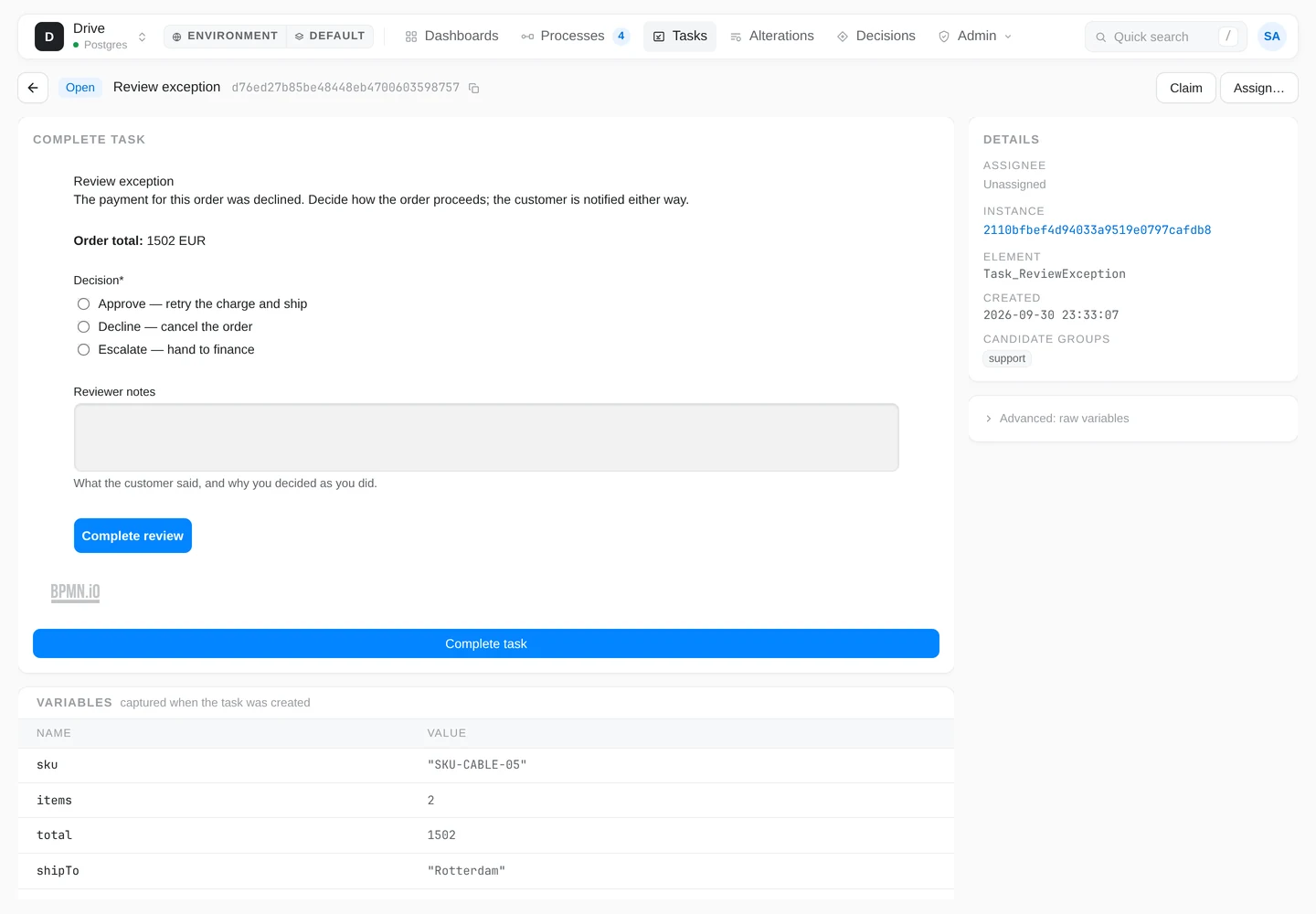
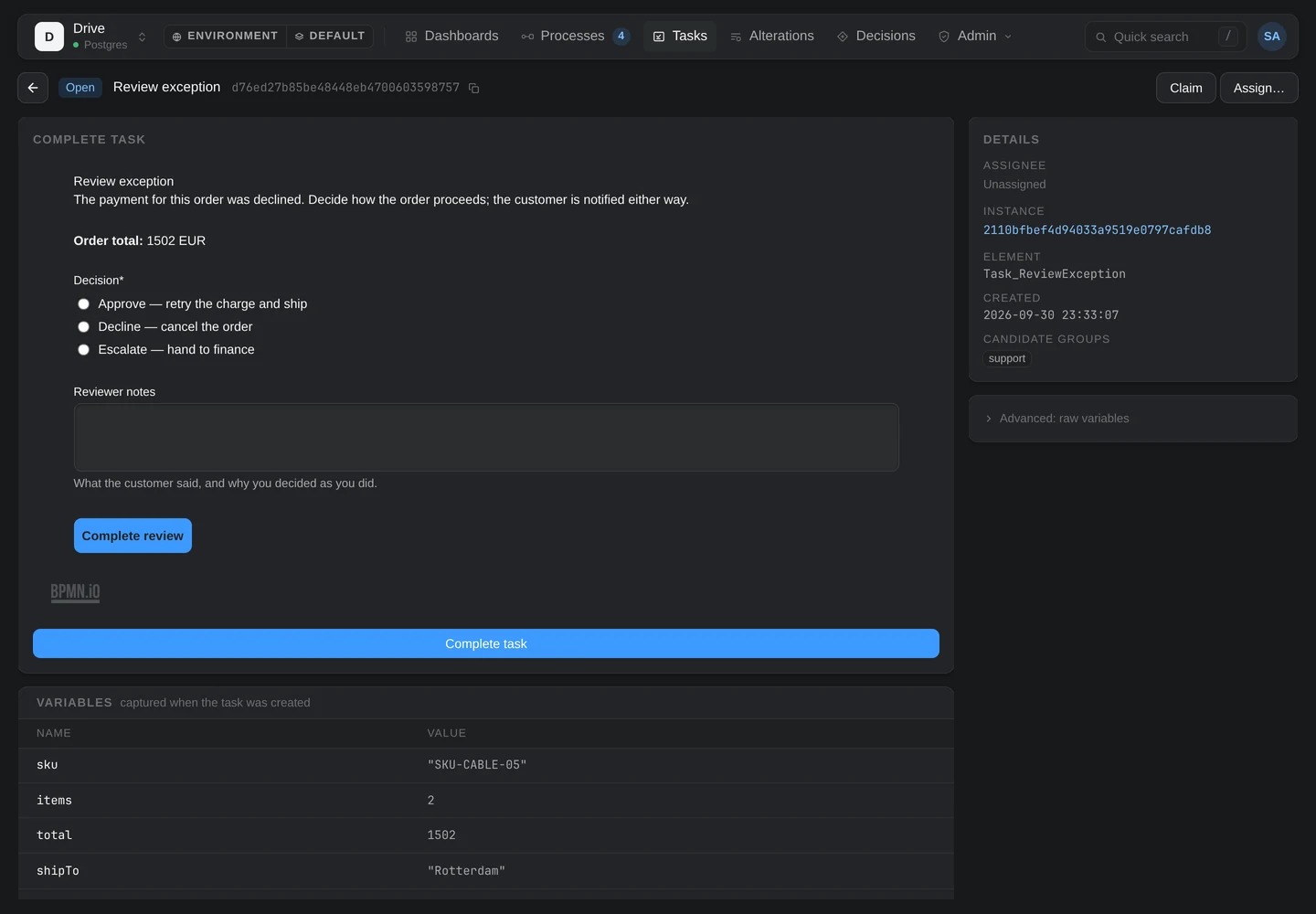
An unassigned task is yours to fill in, claimed or not; someone else’s renders read-only unless you hold tasks:complete-any. The raw JSON editor stays available for engineers behind an Advanced: raw variables disclosure, and is the only path — opened by default, with the reason on it — when the task pins no form, or the pinned document cannot be read.
The task API#
Everything Drive does here is three calls on the engine host, so a tasklist of your own can do the same. A task row — from GET /v1/tasks, GET /v1/tasks/{id} or GET /v1/instances/{id}/tasks — carries the diagram’s form contract beside its assignment:
{
  "id": "…",
  "instanceId": "…",
  "elementId": "Task_ReviewException",
  "name": "Review exception",
  "state": "Open",
  "createdAt": "2026-09-30T12:04:18Z",
  "assignee": null,
  "candidateGroups": ["support"],
  "candidateUsers": [],
  "formRef": "ReviewException",
  "formDefinitionId": "…",
  "dueAt": null,
  "priority": null,
  "variables": { "orderId": "2481", "total": 4200, "currency": "EUR" }
}formRef— the key the diagram declared, ornullwhen the task names no form.formDefinitionId— the version that key resolved to when the task was created. Pinned for the task’s lifetime;nullwhen the diagram names no form or no deployed form carried the key at creation.candidateUsers,dueAt,priority— the work-queue fields from the same diagram extension, here so a queue can sort and filter without a second read.?sortBy=dueAtand?dueBefore=are accepted on the list.
Read the pinned form#
GET {SHEPTRA_API_URL}/v1/tasks/{id}/form
Authorization: Bearer <access_token>HTTP/1.1 200 OK
Content-Type: application/json
ETag: "<formDefinitionId>"
Cache-Control: private, immutable
{ "id": "ReviewException", "type": "default", "schemaVersion": 19, "components": [ … ] } The body is the deployed document, byte-identical to its deploy. The ETag is the form definition id and the response is private, immutable: a stored version is never rewritten, so cache it for good and send If-None-Match for a 304. The read follows the task’s own visibility rule — another user’s task is 403 without tasks:read-any, as the task read itself is. A task that pins nothing is a 404, distinguishable from an unknown task by its title:
HTTP/1.1 404 Not Found
Content-Type: application/problem+json

{ "title": "No form pinned", "status": 404, "detail": "…", "formRef": "ReviewException" }
detail says which case it is — the diagram names no form, or the key resolved to nothing when the task was created — and formRef carries the key so the caller can say what to deploy. Such a task is still completed with raw variables.
Complete with the form’s data#
Completion is unchanged by forms: the form’s submitted data is the variables object. Render the document with @bpmn-io/form-js-viewer (or anything that reads the same JSON), take the data its submit produces, and post it:
POST {SHEPTRA_API_URL}/v1/tasks/{id}/complete
Authorization: Bearer <access_token>
Content-Type: application/json

{
  "variables": {
    "decision": "approve",
    "reviewerNotes": "Customer confirmed the replacement card."
  }
}
The variables merge into the instance and the token moves on. The engine does not check the body against the form — validation is the renderer’s job, and the raw path exists precisely so an engineer can complete a task without one. An unassigned task can be completed by any signed-in caller, or claimed first so nobody else works it (POST /v1/tasks/{id}/claim, first claim wins); a task assigned to someone else needs tasks:complete-any.
The form catalog#
Deployed forms live in the environment’s catalog beside its definitions and decisions, readable by any signed-in principal:
| Call | What it answers |
|---|---|
POST /v1/forms | Deploys a form-js document; the raw JSON is the body, Idempotency-Key is honoured. Needs forms:deploy. |
GET /v1/forms | Lists versions, newest first — ?key=, ?search=, ?latestOnly=true for the newest per key, paged like the definition catalog. Metadata only. |
GET /v1/forms/{id} | One version’s metadata: id, key, version, schemaVersion, componentCount, createdAt. |
GET /v1/forms/{id}/schema | The document, byte-identical, under the same ETag and Cache-Control as the task’s form read. |
Validation on deploy is structural only. The engine checks that the document can be versioned and that what it collects can land on an instance; it does not render it. An invalid document is a 400 listing every problem, each with one of six codes:
| Code | When |
|---|---|
Form.InvalidJson | The body does not parse as JSON. |
Form.MissingId | No non-blank top-level id — there is nothing to version the form under. |
Form.MissingComponentKey | An input component has no key, so nothing it collects could land on the instance. |
Form.DuplicateKey | Two components in the same data scope share a key. A group or dynamic list with a path opens a nested scope and occupies that name in its parent’s. |
Form.UnsupportedComponent | A component type this release refuses — the three named below — or one form-js does not ship. |
Form.UnsupportedSchemaVersion | A schemaVersion above 19, the value the pinned form-js release stamps. |
What a form may contain#
Everything form-js 2.0 ships, up to schemaVersion 19, except three component types refused by name. Accepted:
textfield, textarea, number, datetime, select, radio, checkbox, checklist, taglist, expression, button, text, html, image, spacer, separator, table, group, dynamiclist.
Refused, with the reason in the deploy error:
filepickeranddocumentPreview— file upload and the preview of an uploaded file. An upload needs somewhere to put the bytes, and the managed engine has no blob store yet; the two are the collect and render halves of one feature and arrive together, when they do.iframe— third-party content embedded inside a task form is a cross-origin surface nobody has reviewed, so it stays out.
The Modeler’s palette leaves these three out. A document that already carries one — imported from elsewhere — still opens in the builder, and the problems panel names it; the engine is the gate, not the editor.
Which version a task gets#
Newest at creation, then pinned. When a token arrives at a user task, the engine resolves the task’s key to the newest deployed version in the task’s organization and partition — Camunda 7’s latest binding, captured once — and pins that version’s id on the task. From then on nothing moves it: redeploying the key creates a new version, open tasks keep the form they were created with, and the next task created pins the new one. A person halfway through a form never has it change under them, and a re-published form never changes what an open task submits.
Per environment, per partition. A form is deployed to one environment, and within it to one partition — the default partition unless you choose another when deploying. A key resolves only inside the partition the task runs in, so a process deployed to a partition needs its form deployed there too; the Modeler’s deploy dialog and the ?tenantId= query on POST /v1/forms both name it. Deploying a form to one partition changes nothing in any other.
Not here yet#
- File upload in a form — the two refused components above, waiting on a blob store.
- Start forms — a form on a none start event, so an instance can be started from a form’s input. The same catalog and the same attribute will carry it; it is a planned follow-on, not a shipped feature.
- Public or anonymous forms — every form read and every completion is authenticated. Putting a form in front of someone without an account is a separate decision that has not been taken.